


David W.(BidX)
“SPACEGOATS mirrors our vision and drive — reliable, hard-working, and always ready to go the extra mile.”
€100M+ Amazon Revenue · 2M+ products sold each year
With SPACEGOATS, brands go global on Amazon without the hassle!
No need for your own seller account, no paperwork, no compliance
headaches. We run the infrastructure. You run the brand.





"Every minute of my day goes into creative marketing. SPACEGOATS handles the rest."
So your brand takes off on Amazon.
Amazon Broker
We sell your products on our Amazon accounts across 11+ countries. No seller account needed, no compliance headaches — just revenue.
So your brand takes off on Amazon.
Sell in 11+ Countries, just like that.
With SPACEGOATS as your Amazon Broker, you get instant access to all major European and North American marketplaces. No entity needed, no hassle — we handle everything from compliance to logistics.
HOW IT WORKSNavigate Amazon Marketplaces like a Pro.
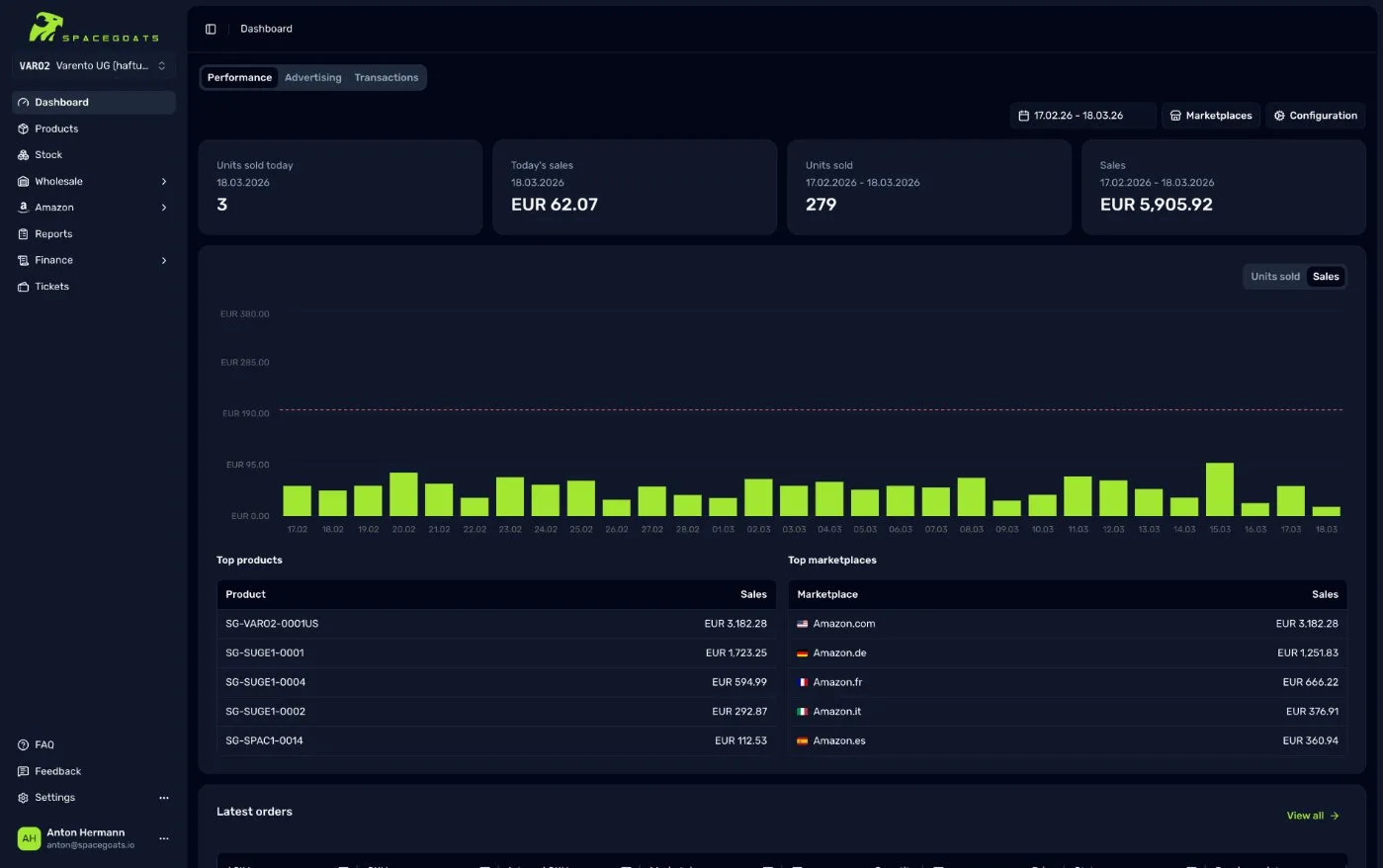
Galaxy puts every marketplace lever at your fingertips, turning Amazon management into a single, intuitive cockpit. Real-time sales, fee and inventory data flow together, so you see exactly what's happening—and what to do next—without hopping between tabs.
When growth calls, launch new marketplaces, sync catalog updates and tune pricing in minutes from the same screen. Scale faster, stay focused on strategy, and keep full control of every detail as your brand accelerates.
Welcome to the Galaxy! See, decide, and act—your marketplace universe on one screen.

€100M+ Amazon Revenue generated













We combine proven infrastructure with hands-on operations — so your brand grows reliably across markets, without the friction of building it all yourself.
Trusted by 100+ brands. Powered by experience. Ready for what's next.
Join the SPACEGOATS Family.
We combine proven infrastructure with hands-on operations — so your brand grows reliably across markets, without the friction of building it all yourself. Trusted by 100+ brands. Powered by experience. Ready for what's next.
BECOME PART“SPACEGOATS mirrors our vision and drive — reliable, hard-working, and always ready to go the extra mile.”

“SPACEGOATS keeps the account solid — their focused, capable team continually pushes the extra mile.”

“Spacegoats offers direct and fast sales entry, strong in Operations and Compliance. Their quick, expert responses are key to our business success.”

“Being SPACEGOATS' very first brand felt like a leap; their pioneering drive and steadfast support turned it into a lasting milestone.”

“Thanks to SPACEGOATS, we can focus on what we love — developing great products and engaging with our community.”
Whether you're launching a new sales channel with GOAT-to-Market, navigating compliance challenges, or aiming to make e-commerce fairer – choose your mission, fill out the form, and we'll be in touch shortly.
Which universe are you heading to?
Whether you're just starting your Amazon journey or you're an established seller looking to scale globally, SPACEGOATS has the expertise and infrastructure to help you succeed. Let's talk about your goals.
Amazon insights. Delivered monthly.
Trends, strategies, compliance updates — everything you need to stay ahead on Amazon. No spam, just signal.
More about SPACEGOATS
A clean, search-friendly overview of how SPACEGOATS helps brands launch, scale, and stay compliant across international Amazon marketplaces.
Broker Model
SPACEGOATS is a Germany-based Amazon broker and full-service partner that helps brands sell on Amazon in more than 11 countries without building their own Seller Central operation. Founded in 2016 in Filderstadt, Germany, SPACEGOATS runs its own Amazon infrastructure covering compliance, VAT coordination, advertising, logistics, and customer support for more than 100 brands.
The company also offers product compliance consulting, migrations to brand-owned Amazon accounts, and the Galaxy dashboard for real-time performance visibility.
How It Works
Selling through an Amazon broker is straightforward: SPACEGOATS buys products from the brand on agreed wholesale terms and resells them via its own Amazon Seller Central accounts across multiple marketplaces.
Brands avoid the operational burden of VAT registrations, FBA setup, multilingual customer service, and marketplace expansion. Most launches go live within 30 days, with reporting and payouts tracked transparently in the Galaxy dashboard.